

Just-in-time migration
Just-in-time (JIT) migration allows customer accounts to be migrated to Strivacity when customers authenticate for the first time after Strivacity becomes the identity provider.
Instead of importing all customer accounts upfront, customer data is retrieved from the legacy system during authentication and then created in Strivacity.
How it works
-
Customer login: When a customer attempts to sign in, Strivacity checks whether the customer account already exists in the target identity store.
-
Data retrieval: If the account does not exist in Strivacity, Strivacity retrieves the customer's account information from the legacy system.
-
Password migration: If the account exists in the legacy system, Strivacity attempts to authenticate the customer using the password provided during sign-in. If authentication is successful, the presented password is stored as the customer's password in Strivacity.
-
Data transformation: The retrieved customer data is transformed to match the schema of the target Strivacity identity store.
-
Account creation: The transformed customer data is stored as an account in Strivacity.
-
Authentication completion: The customer is authenticated and granted access. Future authentications are handled directly by Strivacity.
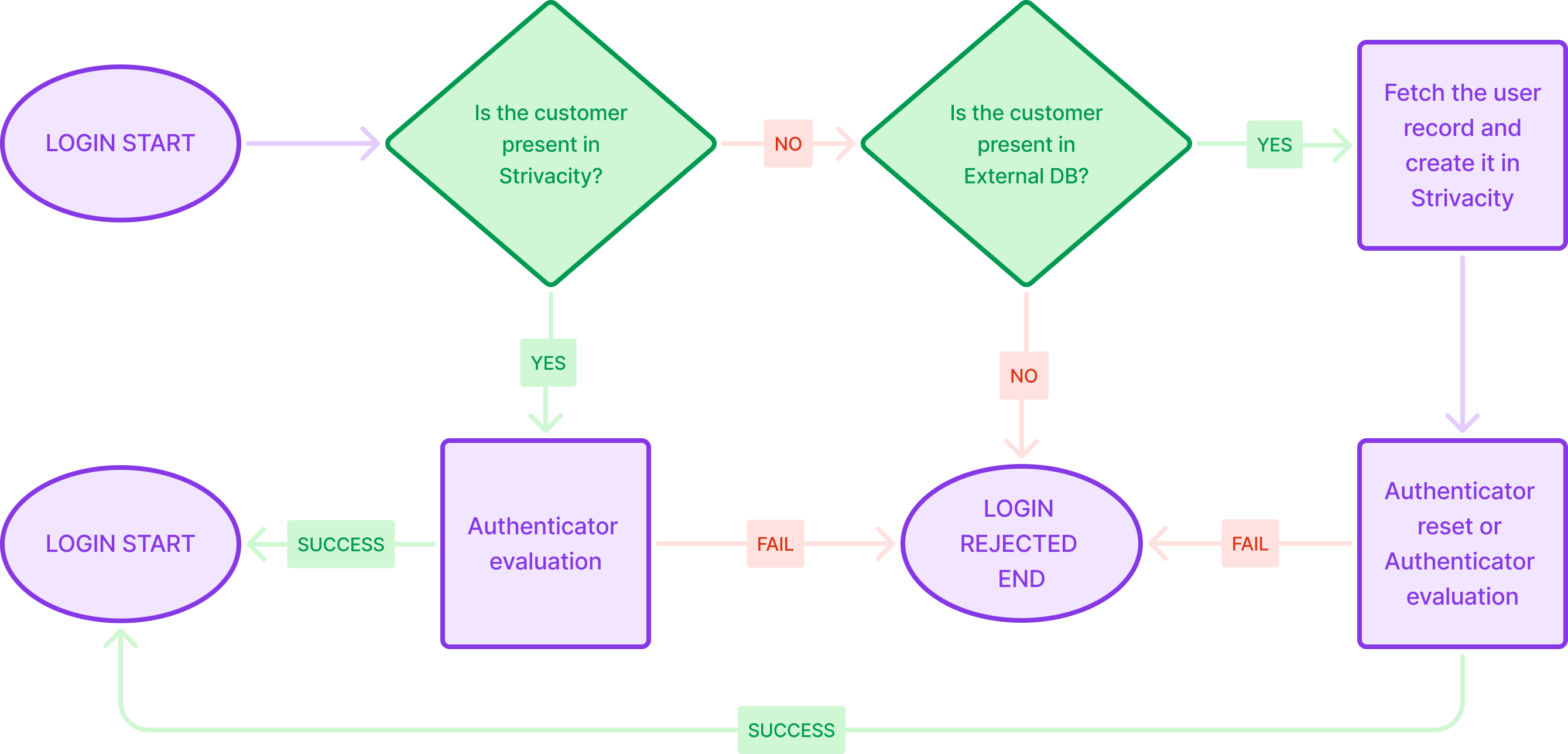
Customer login flow with just-in-time migration
Integration options
JIT migration requires an integration between Strivacity and the legacy customer store.
The following capabilities can be used to implement and support a JIT migration:
- Custom scripts and hooks: Use custom scripts to retrieve, transform, and process customer data during migration. Hooks can be used to execute migration logic at specific points in the authentication flow.
- API integration: Integrate with external APIs and legacy systems to retrieve customer data and create customer accounts in Strivacity.
- Logging and monitoring: Implement logging and monitoring to track migration activity, troubleshoot issues, and verify successful account migration.
- Plugin library examples: The plugin library includes example account migration and RDBMS account migration plugins that can serve as a starting point for implementation.
Best practices
- Pre-migration assessment: Conduct a thorough assessment of your legacy system and data to identify potential challenges.
- Data validation: Implement robust data validation processes to ensure the accuracy and integrity of migrated data.
- Testing: Perform extensive testing of the JIT migration process to identify and resolve issues before going live.
- Customer communication: Inform customers about the migration process to manage their expectations and provide support as needed.
Updated 4 months ago