

Entity linking and contextual navigation
Strivacity provides contextual navigation between related configuration entities in the Admin Console. This allows administrators to quickly access referenced items without manually searching or navigating across modules.
Approach
- Direct navigation to related entities (for example, from an application to its assigned policies)
- Quick access to entity IDs with copy actions
- Reduced need for manual searching and context switching
How it works
Entity linking
When an entity references another (for example, an application referencing a policy):
- The referenced item is clickable and opens the corresponding configuration page
- Additional actions are available via the context menu (⋮), such as:
- Go to [entity]
- Copy [entity] ID
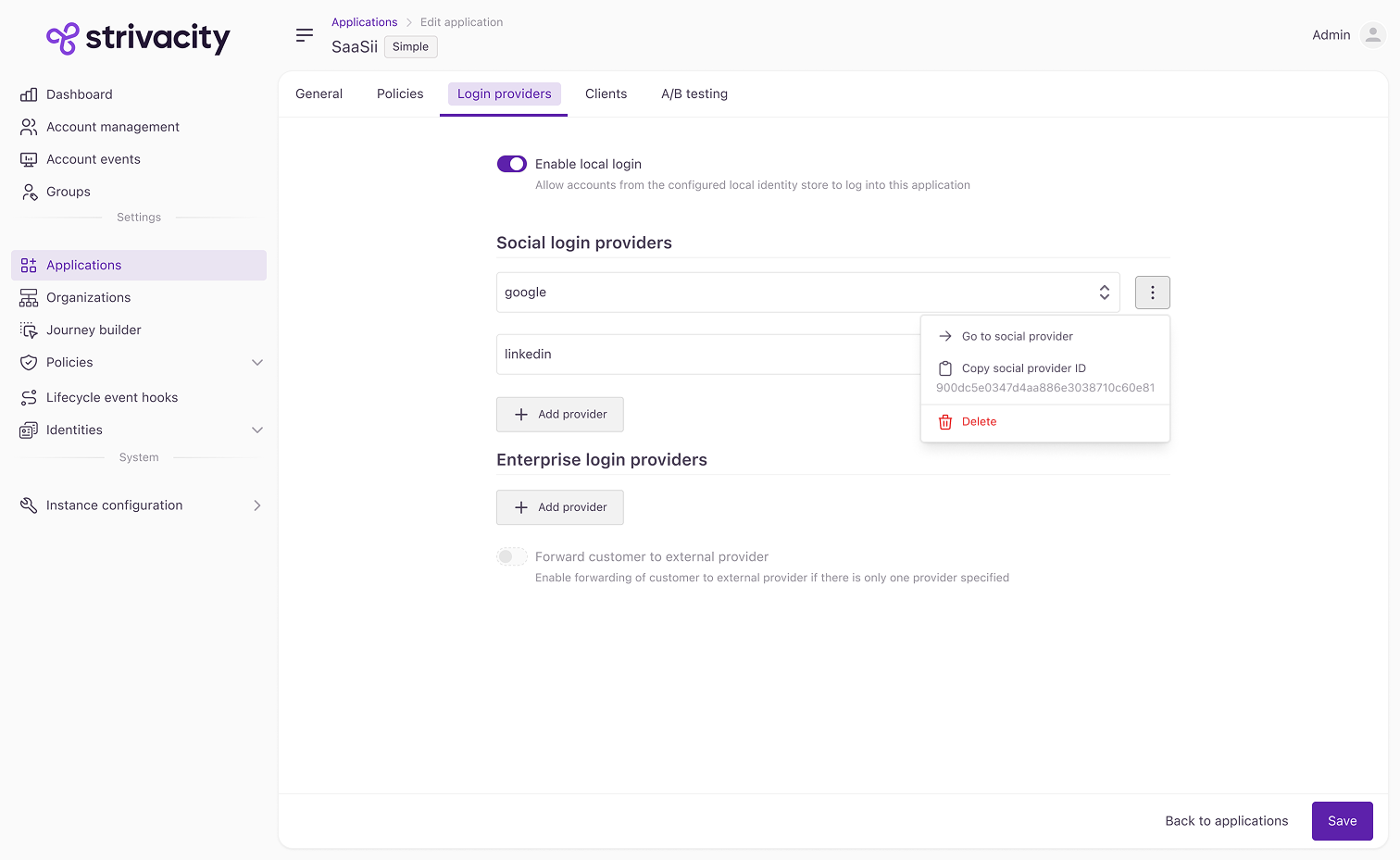
Contextual filtering
Some areas of the Admin Console support contextual navigation with pre-applied filters.
For example:
- Selecting Filter account events by application navigates to the Account Events page
- The selected application is automatically applied as a filter
This allows administrators to:
- Maintain context across modules
- Avoid manual filtering
- Troubleshoot more efficiently
Behavior and considerations
- Navigation respects access control permissions
- Linked entities open in the same or new context, depending on UI behavior
- Available actions may vary depending on entity type
Updated 6 months ago
Did this page help you?